
Practical AI Tools You Can Try
A quick-glance guide to practical AI tools for writing, learning, coding, research, design, images, audio, and music. Explore trusted tools with free or free-to-try options, plus selected paid services worth knowing about.
Everyday AI Tools
AI tools can help with writing, learning, research, coding, design, images, audio, and creative projects.
This guide highlights useful tools that real people can try, including free and free-to-try options. It is designed for curious learners, creators, students, parents, hobbyists, and everyday users who want practical tools without the hype.
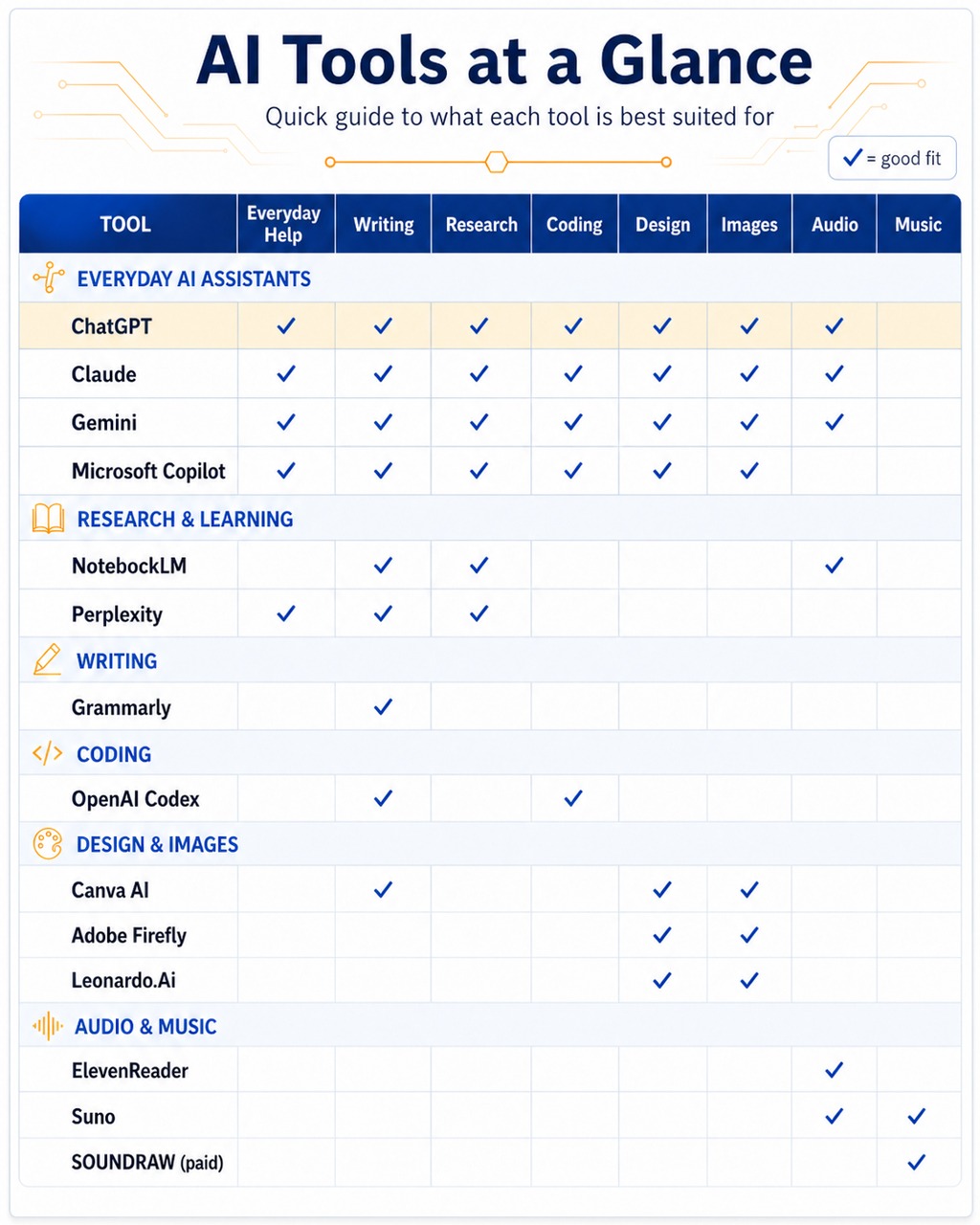
Everyday AI Assistants
Use these tools for general questions, writing help, planning, brainstorming, explanations, and everyday problem-solving.
ChatGPT
Best for: Everyday AI help, writing, brainstorming, learning, planning, and problem-solving.
ChatGPT is a strong starting point for general AI use. It can help explain topics, draft text, brainstorm ideas, rewrite content, plan projects, and explore creative prompts.
- Explaining tricky topics
- Drafting emails, stories, or activities
- Brainstorming quiz and word game ideas
- Getting help with simple coding questions
Google Gemini
Best for: Everyday questions, planning, writing, and Google users.
Gemini is Google’s AI assistant. It can help with everyday questions, writing, brainstorming, explanations, and creative planning.
- Planning a project
- Drafting outlines
- Asking everyday questions
- Comparing options or ideas
Claude
Best for: Writing, planning, summaries, and working through longer ideas.
Claude is useful for turning rough notes into clearer writing. It is also helpful for editing drafts, comparing ideas, planning content, and shaping longer pieces of work.
- Improving written drafts
- Summarising notes
- Planning articles or lessons
- Rewriting text in a clearer tone
Microsoft Copilot
Best for: Quick answers, ideas, feedback, and Microsoft users.
Microsoft Copilot is a practical AI companion for everyday tasks. It can help with questions, writing ideas, summaries, and general productivity.
- Quick explanations
- Drafting short text
- Getting a second opinion
- Exploring ideas before deeper research
Research and Learning
Good options for checking sources, learning from documents, and organising research.
NotebookLM
Best for: Learning from your own documents, notes, and study material.
NotebookLM helps you work with your own sources. Add documents, notes, or links, then ask questions, generate summaries, or create study material from them.
- Summarising long documents
- Asking questions about uploaded sources
- Creating study notes
- Organising research
Perplexity
Best for: AI-powered search with sources.
Perplexity is useful when you want answers that include links to sources. It works well as a research starting point when you want to check where information comes from.
- Researching a topic
- Finding source-backed answers
- Comparing information
- Exploring current subjects
Writing and Communication
Helpful tools for clearer writing, grammar, tone, and everyday communication.
ChatGPT for Writing
Best for: Drafting, rewriting, brainstorming, and structure.
ChatGPT can help turn rough ideas into outlines, drafts, titles, summaries, quizzes, and creative prompts.
- Blog ideas
- Learning activities
- Short stories
- Clearer explanations
Claude for Long-Form Writing
Best for: Longer drafts, editing, structure, and tone.
Claude is useful when you want to shape longer content, improve wording, or make writing easier to follow.
- Editing longer drafts
- Summarising detailed notes
- Improving structure
- Polishing tone
Grammarly
Best for: Grammar, spelling, clarity, tone, and writing support.
Grammarly helps improve writing by checking grammar, spelling, clarity, and tone. It can support emails, documents, social posts, study work, and professional writing.
- Checking grammar and spelling
- Improving clarity
- Rewriting awkward sentences
- Polishing emails and documents
Explore Our GPT Workshop
Discover custom GPT ideas, practical examples, and everyday tools designed to inspire creativity and useful AI exploration.
Coding and Website Experiments
Useful for people exploring websites, WordPress, simple scripts, debugging, or technical learning.
OpenAI Codex
Best for: Coding help, debugging, code explanations, and software projects.
Codex is OpenAI’s coding agent. It can help explain code, draft features, fix bugs, and support software or website experiments.
- Understanding unfamiliar code
- Fixing bugs
- Drafting small features
- Explaining technical problems
- Website and WordPress experiments
Claude for Technical Planning
Best for: Thinking through code structure, documentation, and project planning.
Claude can help organise technical notes, explain options, and turn complex project ideas into clearer plans.
- Project outlines
- Documentation drafts
- Technical summaries
- Comparing development options
ChatGPT for Coding
Best for: Simple code help, explanations, and beginner-friendly support.
ChatGPT can help explain coding concepts, suggest small snippets, troubleshoot errors, and turn technical ideas into clearer steps.
- Explaining error messages
- Learning basic code concepts
- Planning website features
- Writing simple scripts
Design and Images
Creative tools for posters, graphics, visual ideas, image generation, and design experiments.
Canva AI
Best for: Designs, social posts, posters, presentations, worksheets, and visual projects.
Canva is beginner-friendly and useful for creating polished visual content without advanced design skills.
- Posters and flyers
- Social media graphics
- Presentations
- Worksheets and learning resources
Leonardo.Ai
Best for: AI images, concept art, creative visuals, and visual experimentation.
Leonardo.Ai is useful for generating artwork, character concepts, story visuals, and creative image ideas.
- AI-generated artwork
- Character ideas
- Fantasy or story visuals
- Concept images
Adobe Firefly
Best for: AI images, creative edits, and design inspiration.
Adobe Firefly helps generate and edit visuals using AI. It is a useful tool for creative experiments and image ideas.
- Generating images from prompts
- Creating visual concepts
- Editing images with AI
- Exploring creative styles
Audio and Music
Tools for listening to text, experimenting with music, and creating audio ideas.
ElevenReader
Best for: Listening to documents, articles, PDFs, ebooks, and study material.
ElevenReader reads text aloud using AI voices. It can help with learning, accessibility, proofreading, and listening on the go.
- Reading PDFs aloud
- Listening to articles
- Reviewing written drafts
- Supporting study sessions
Suno
Best for: AI music experiments, songwriting ideas, and playful creativity.
Suno can turn prompts into songs or musical ideas. It is a fun option for experimenting with lyrics, moods, genres, and creative audio.
- Short song ideas
- Lyric experiments
- Music style tests
- Creative audio prompts
Paid Services Worth Knowing About
Some tools are mainly useful through paid plans. These may still be worth exploring when you need more control, licensing options, or creator-focused features.
SOUNDRAW
Best for: Royalty-free AI music, background tracks, beats, and creator projects.
SOUNDRAW is an AI music generator focused on customisable royalty-free music. It can help create background tracks for videos, podcasts, presentations, games, and other creative projects.
- Background music
- Podcast intros
- Video soundtracks
- Beats and instrumental ideas
- Creator projects that need licensed music
Try the Original Noggin Wordsmith Word Game
Looking for a fun and challenging way to keep your mind sharp and improve your vocabulary? Noggin Wordsmith is the perfect solution! This exciting word puzzle game combines classic gameplay with a unique twist to test your word knowledge and pattern recognition skills. Suitable for players of all ages, Noggin Wordsmith features easy-to-use controls and addictive gameplay that will keep you entertained for hours. Simply swipe the screen to play and see how much you can improve your word game. Give it a try today and discover a new way to keep your mind active and engaged!